Sanjeeva's Software Showcase

Desktop Applications

Free, open-source software for macOS, Windows and Linux. Native apps written in C++, with all source code hosted on GitHub under GPL or AGPL licenses.

TextEditor+

A fast, lightweight code and text editor
  • Version 1.1.0
  • macOS
  • Windows
  • Linux
  • AGPL-3.0
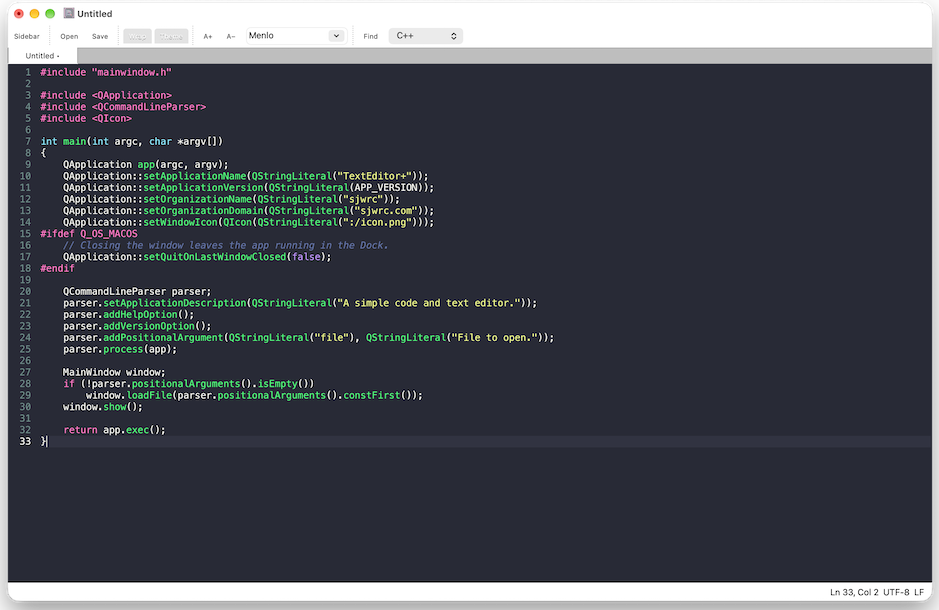
TextEditor+ editing an HTML file with syntax highlighting in the dark Dracula theme

TextEditor+ was born out of my need for a fast, simple text editor that had a syntax highlighying option. Not finding a suitable option that met my needs, I developed an HTML/browser-based version called Web TextEditor that's hosted on this site. TextEditor+ is an OS-native fork of Web TextEditor and keeps the same look and features, while adding many additional features such as native file handling, printing, find and replace, etc.

Features

  • Fast and lightweight: a native C++/Qt 6 application that opens quickly and remains responsive
  • Syntax highlighting for HTML (with embedded script and style), CSS, JavaScript, C and C++
  • Dark and light modes (themes): Dracula (dark) and Eclipse (light)
  • Find and replace with match case, whole word, regular expressions and back-references
  • Line numbers, current-line highlight, auto-indent and word wrap
  • Faithful saving that preserves line endings and encodings (UNIX or DOS)
  • OS-native file dialogues, drag-and-drop, “Open With” and command-line paths
  • Security safeguards against opening binary, very large or special files by mistake

Download

Prefer not to install anything? Try Web TextEditor in your browser. See the release notes for what’s new.
XPreview+

A fast, private PDF, image and document viewer

  • Version 1.0
  • macOS
  • Windows
  • Linux
  • AGPL-3.0
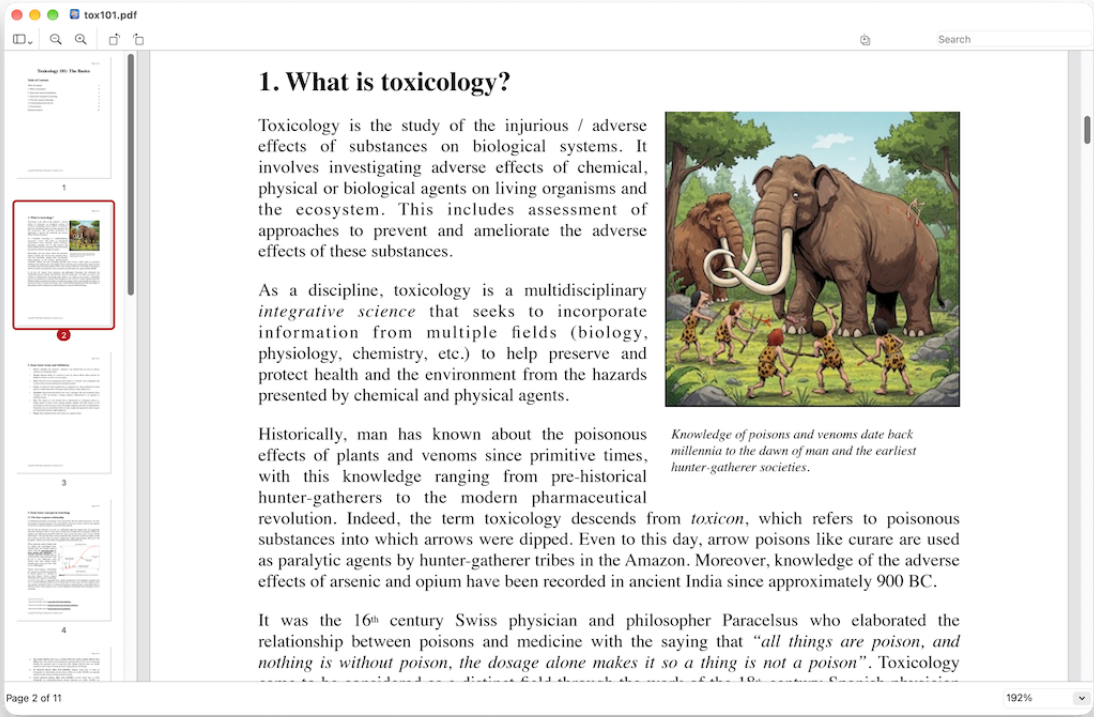
XPreview+ showing an OpenDocument text file with the page thumbnail sidebar

XPreview+ is a viewer for PDF documents, images, RTF and OpenDocument text, in the spirit of macOS Preview. It can export anything it opens to PDF, and its own RTF and ODT renderer means you don’t need Word or LibreOffice to read those files.

Features

  • Opens multiple file formats: PDFs (including password-protected PDFs), images (PNG, JPEG, GIF, WebP, multi-page TIFF, BMP and SVG; HEIC and JPEG 2000 on macOS), RTF and OpenDocument text (ODT, OTT, FODT)
  • Export documents and files as PDFs. For any compatible file: PDFs are copied as-is (byte for byte); RTF and ODT become vector pages with selectable, searchable text
  • Built-in RTF and ODT reader that handles fonts, colors, lists, tables with merged cells, images, headers and footers, and footnotes, using metric-compatible fonts so pages break as in the original
  • Fast performance: Qick to load, tiled rendering, smooth zoom and trackpad gestures
  • Search with highlighted results, text selection and copy, clickable links and printing
  • Private: Runs locally on your computer and never connects to the internet, runs macros or scripts, or loads external files a document references
  • Security-hardened: every file is treated as high-seßurity, with bounded, fuzz-tested parsers

Download

Read the user manual (PDF), or see the release notes for what’s new. Linux builds from source have not yet been tested.
ProtMate

A system for performing biochemical & biophysical calculations

  • Version 1.2.0
  • macOS
  • Windows
  • Linux
  • GPL-3.0
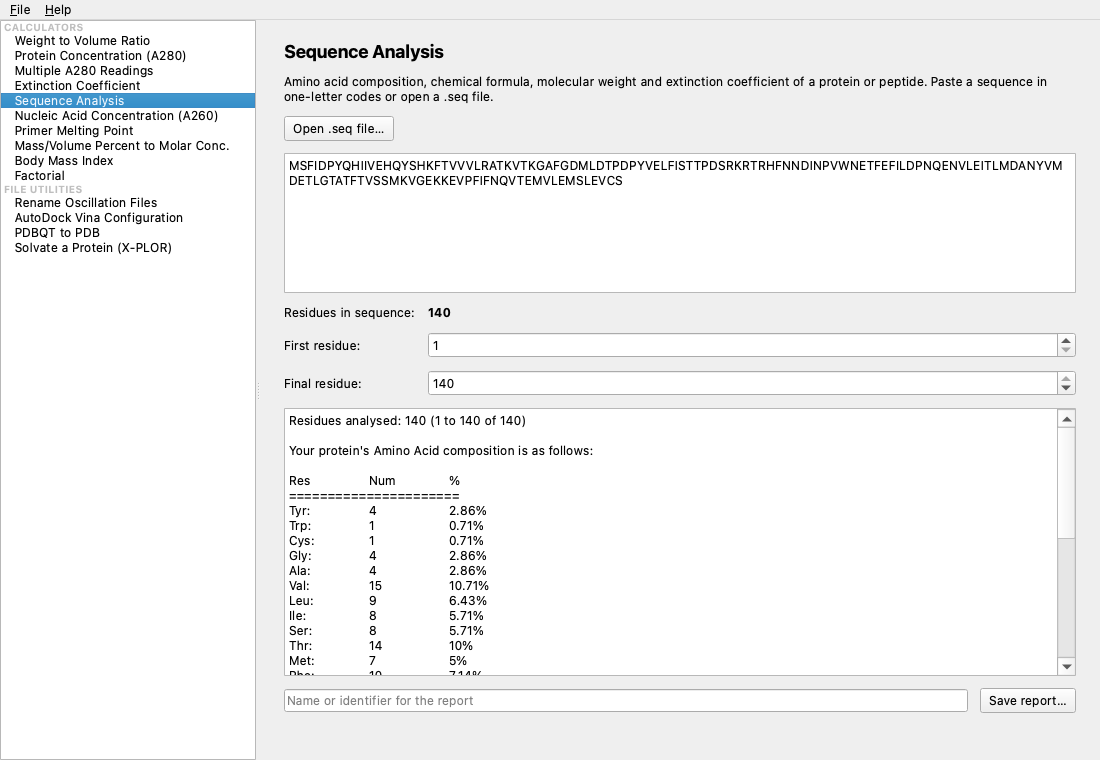
ProtMate desktop application analysing a protein sequence, showing composition, molecular weight and extinction coefficient

ProtMate handles common laboratory calculations for biochemical and biophysical work. It comes as a desktop application whose results update as you type, and as pmate, a terminal application for use on desktops, servers, SSH sessions and for users who prefer a keyboard-centric interface. Both share a common calculation library, so they yield identical results and write identical reports.

Calculators

  • Protein concentration and yield from A280
  • Protein sequence analysis: composition, formula, molecular weight, extinction coefficient
  • Nucleic acid concentration from A260
  • Primer melting temperature (basic and salt-adjusted)
  • Weight/volume ratios and percent-to-molar conversion

File utilities

  • AutoDock Vina configuration files, and running Vina
  • PDBQT to PDB conversion
  • X-PLOR/CNS protein solvation scripts
  • Renaming oscillation images for Mosflm
  • Opening structures in RasMol

Download

Also available: a Linux ARM64 AppImage and stand-alone pmate terminal builds for macOS, Linux x86-64 and Linux ARM64. Read the user guide (PDF), or try Web ProtMate in your browser.

Installing on macOS and Windows

The apps are not notarised by Apple. The first time you open one on macOS, go to System Settings › Privacy & Security and choose Open Anyway.

The Windows builds are portable: extract the zip and run the program; nothing is installed. Windows SmartScreen may ask you to confirm (More info › Run anyway). Where possible, I have tested the Windows versions in a virtual machine. However, I don't have access to a dedicated Windows PC and unforseen errors may arise (please submit a bug/issues report in GitHub).

For the command-line version of ProtMate, simply copy pmate to a folder in your PATH variable (e.g., /usr/local/bin) and run chmod +x pmate to make it executable.

Building from source

All three applications build with CMake 3.21 or later and Qt 6, with a C++17 compiler (C++20 for XPreview+). ProtMate’s terminal version can be built without Qt. Step-by-step instructions for each platform are in the README of each repository: TextEditor+, XPreview+ and ProtMate.

Licenses

TextEditor+ and XPreview+ are released under the GNU Affero General Public License v3. ProtMate is released under the GNU General Public License v3. All three use the Qt framework under the GNU LGPL v3.

These software packages are distributed freely under open-source licenses in the hope that you find them to be useful, but without any warranty. Always verify ProtMate’s results independently before relying on them.

Reporting problems

Please report bugs on the issue tracker for TextEditor+, XPreview+ or ProtMate. Include the version, your operating system and the steps that lead to the problem. Pull requests are welcome.